Sales teams answer the same WhatsApp questions, then manually copy the customer into Odoo later.
Live and tested
Connect WhatsApp customer conversations directly to Odoo.
Zenvox links your WhatsApp inbox with Odoo so customer questions can be answered from approved company information and live business records, while leads, inquiries, and follow-up tasks are created automatically.
Integration statusOdoo connected workflow
Odoo connectivity is live and tested for customer records, leads, and inquiries.
Customer records created in OdooLead and inquiry loggingOrder, stock, and account contextEnglish and Arabic WhatsApp replies
The problem
When WhatsApp and Odoo are separate, your team becomes the integration.
Operations staff check stock, order status, or customer history in Odoo while the customer waits on WhatsApp.
Owners cannot see which WhatsApp inquiries became leads because the conversation trail is outside the ERP.
Data flow
From customer WhatsApp message to Odoo record.
Customer asks on WhatsApp
A customer messages your existing WhatsApp number in English or Arabic about stock, price, delivery, order status, or a service question.
Zenvox reads the intent
Zenvox identifies whether the customer needs a simple knowledge-base answer, live Odoo data, or a human decision.
Odoo context is checked
The agent can reference configured Odoo records such as customer profiles, product availability, sales orders, leads, and inquiry history.
Answer and record are created
Zenvox replies on WhatsApp when the answer is approved, then creates or updates the Odoo record with transcript, inquiry type, and owner.
Product screenshots
What your team sees when WhatsApp data reaches Odoo.
WhatsApp inquiry resolved with Odoo context
Zenvox action
Zenvox checked Odoo stock, matched the customer account, and prepared a reply with availability and next step.
CustomerAl Noor Trading LLC
Matched in OdooProductABC-123
AvailableInquiry typeStock and delivery
OwnerSales team
Structured record created from the conversation
Zenvox action
The Odoo entry includes customer details, source, transcript summary, inquiry category, and follow-up owner.
RecordLead created
SourceWhatsApp via Zenvox
ConversationAttached summary
Next actionConfirm price and delivery slot
Open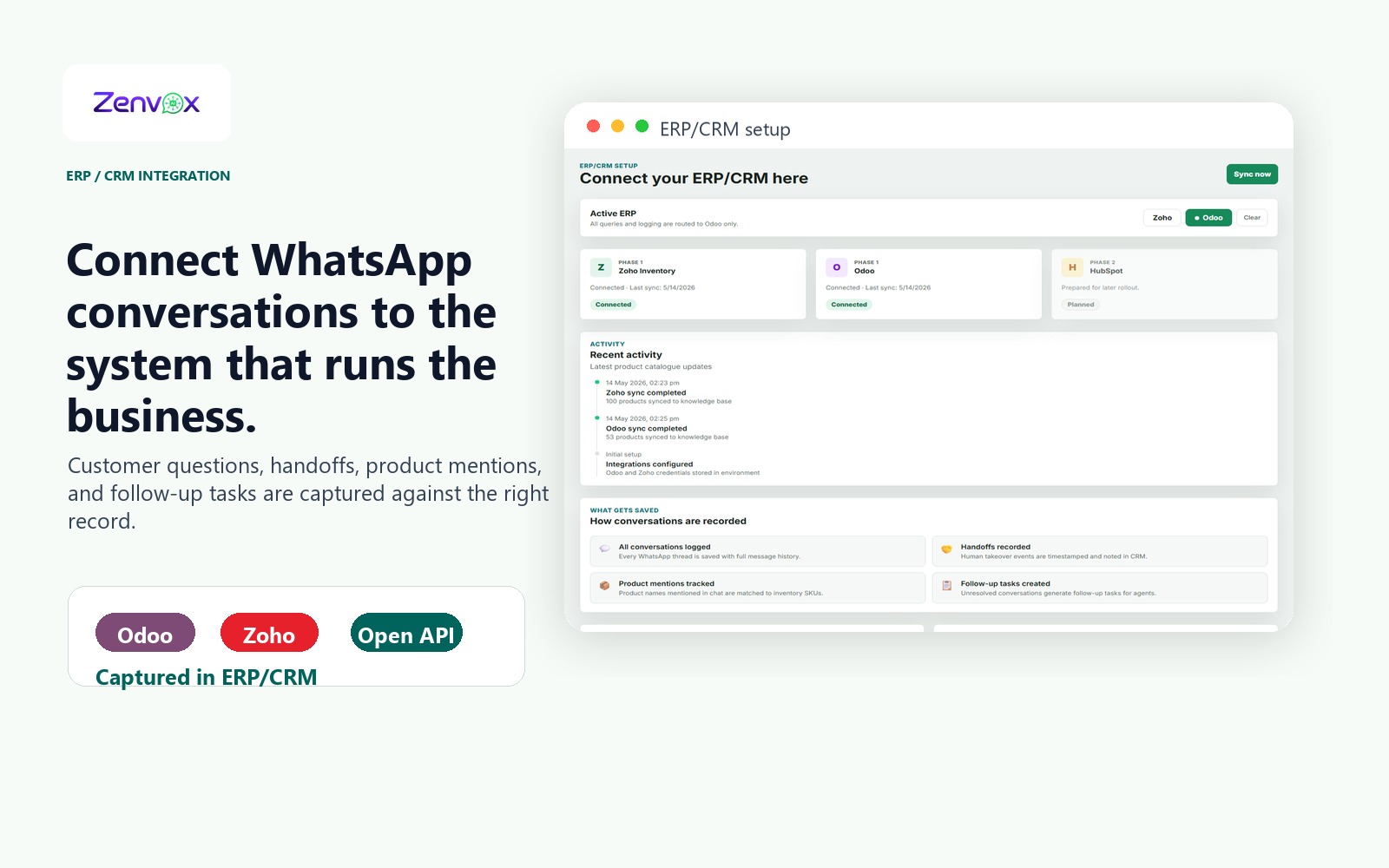
Actual product view
See the ERP connection screen your team works from.
Zenvox shows which systems are connected, when the latest sync ran, and what conversation data will be saved back to Odoo after WhatsApp chats are handled.
Odoo and Zoho status visibleRecent sync activityConversation records savedFollow-up tasks created
Use cases
High-volume WhatsApp work that should not stay inside chat history.
Live stock and price inquiries
Do you have this model in stock?What is my price for 100 pieces?Can you deliver to Abu Dhabi this week?
Zenvox reads the item, checks the approved product and pricing knowledge, looks up configured Odoo stock or customer context, then replies with the right availability and handoff if pricing needs approval.
Fewer missed sales inquiries and less manual checking between WhatsApp and Odoo.
Order and inquiry follow-up
Where is my order?Did you receive my PO?Who is handling my request?
Zenvox matches the customer or order reference, retrieves the configured Odoo status, explains the current stage in plain language, and updates the record with the latest customer message.
Customers get faster answers while the Odoo record stays complete for operations and sales managers.
Records
The ERP gets structured business data, not just a chat transcript.
Zenvox turns WhatsApp conversations into clean operational records your team can search, assign, report on, and follow up.
Contacts and companiesLeads and opportunitiesCustomer inquiriesSales order referencesConversation summariesFollow-up owners
FAQ
Common questions about Odoo connectivity.
Is the Odoo integration live?
Yes. Odoo is the current live and tested ERP integration for Zenvox. The exact objects connected depend on your Odoo setup, permissions, and the workflows agreed during onboarding.
Can Zenvox write records into Odoo?
Yes. Zenvox can create or update configured records such as customers, leads, and inquiries. Sensitive steps can be routed for human approval before anything important is committed.
Can it answer using live Odoo data?
Where the integration is configured, Zenvox can reference approved Odoo data such as customer, product, order, or inquiry information. It still follows your knowledge rules and hands off if the answer is uncertain.
Will my team still see the WhatsApp conversation?
Yes. Zenvox logs the conversation and attaches the relevant context to the created or updated record. Your team gets the customer request, AI summary, and next action in one place.
Next step